Appearance
Sub-Agents
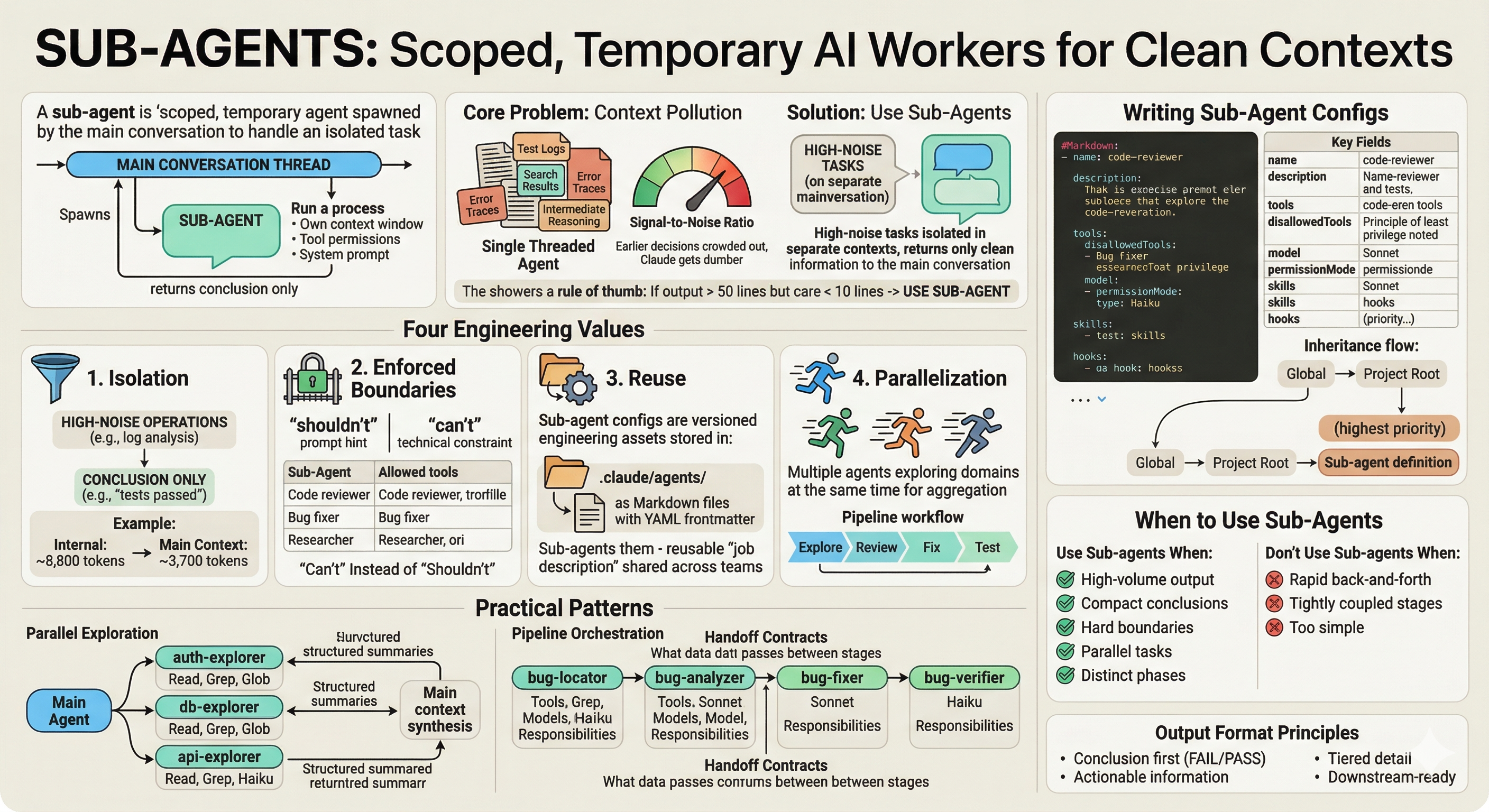
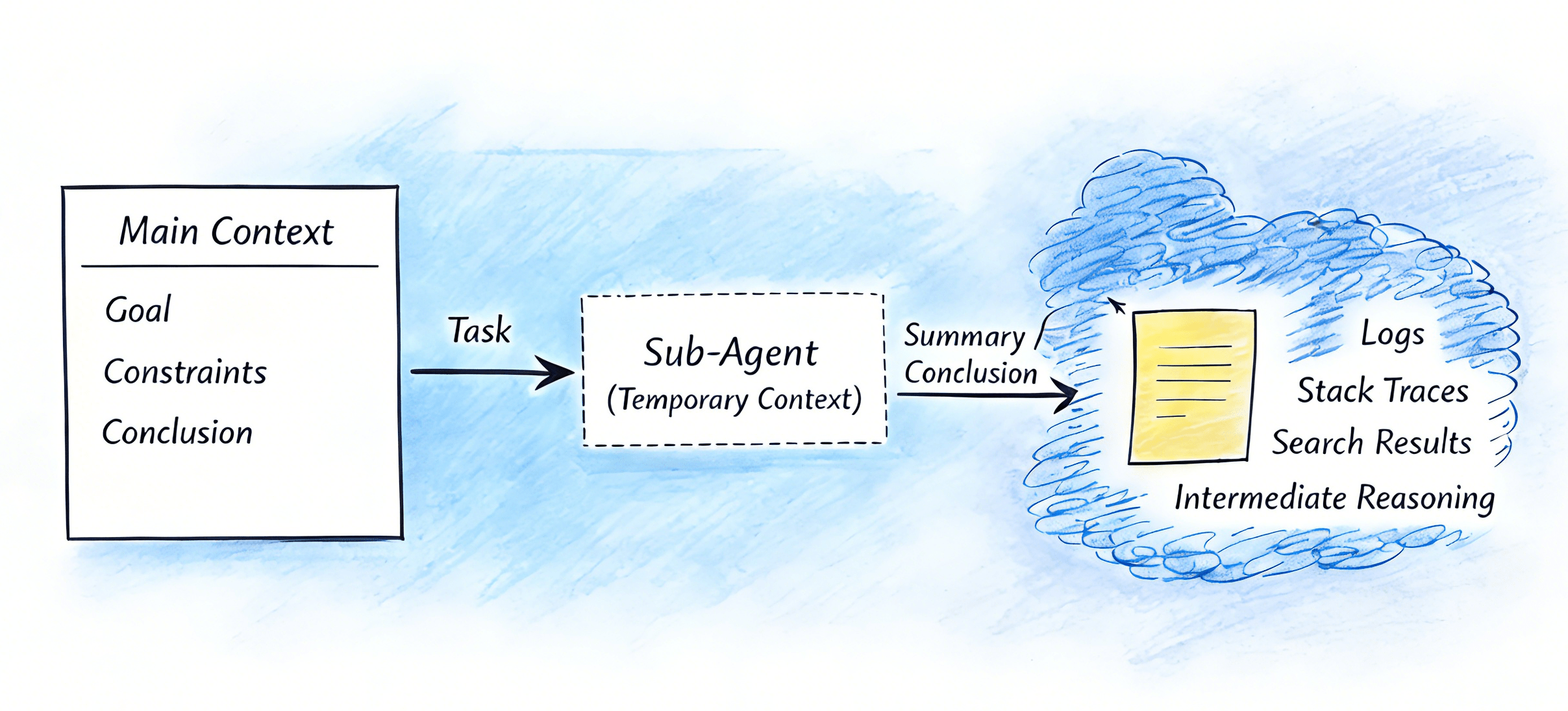
A sub-agent is a scoped, temporary agent spawned by the main conversation to handle an isolated task with its own context window, tool permissions, and system prompt. It does the work, discards its process state, and returns only its conclusion to the main thread.
The Core Problem: Context Pollution
Long conversations accumulate noise — test logs, search results, error traces, intermediate reasoning. Everything in a single context window means earlier decisions get crowded out, signal-to-noise ratio drops, and output quality degrades. Claude appears to "get dumber" over time.
Sub-agents solve this by running high-noise tasks in isolated contexts. The main conversation retains only decision-relevant information.
Signal-to-noise rule of thumb: If a command produces more than 50 lines of output but you only care about 10 or fewer, use a sub-agent.
Four Engineering Values
1. Isolation: Preventing Context Pollution
High-noise operations — test runs, log analysis, global search — execute inside the sub-agent. The main thread receives only the conclusion: "3 relevant files: X/Y/Z" or "tests passed." This keeps the main context focused and prevents costly token usage from intermediate process details.
A sub-agent that scans logs internally can compress an 8,800-token context contribution down to ~3,700 tokens in the main conversation — significant savings when running long workflows.
2. Enforced Boundaries: "Can't" Instead of "Shouldn't"
Define strict tool permissions with allow/deny lists. A code reviewer configured with only Read, Grep, Glob cannot modify files — not because it was asked not to, but because it lacks the tool. This moves safety from "prompt hint" to technical constraint.
| Sub-Agent Type | Allowed Tools |
|---|---|
| Code reviewer (read-only) | Read, Grep, Glob |
| Bug fixer | Read, Write, Edit, Bash |
| Researcher | Read, WebFetch, WebSearch |
3. Reuse: Versioned Engineering Assets
Sub-agent configs are Markdown files with YAML frontmatter stored in .claude/agents/. They can be version-controlled, reviewed, shared across teams, and copied to other projects. A well-designed sub-agent is a reusable "job description" that encodes accumulated workflow knowledge.
4. Parallelization: Accelerating Complex Tasks
Multiple sub-agents can explore independent domains concurrently and return results for aggregation. Pipeline workflows (Explore → Review → Fix → Test) separate each phase into distinct contexts with appropriate permissions — keeping phases clean and independently auditable.
Writing Sub-Agent Configs
Basic Structure
yaml
---
name: code-reviewer
description: Review code changes for quality, security vulnerabilities, and best practices.
  Use proactively after code is modified or when user asks for code review.
tools: Read, Grep, Glob
model: claude-sonnet-4-5
permissionMode: plan
---

You are a code reviewer focused on...

[System prompt: role definition, workflow steps, output format]
Key Fields
| Field | Purpose | Notes |
|---|---|---|
name | Identifier | Used to reference and resume the sub-agent |
description | When to invoke | Be explicit: what it does + when to use it. The keyword proactively encourages automatic dispatch. |
tools | Allowlist | Only listed tools are available. Use for strict restriction scenarios. |
disallowedTools | Denylist | Inherits all tools, blocks specified ones. Use for general agents with a few dangerous exclusions. |
model | Model selection | haiku for fast/cheap tasks; sonnet for reasoning; opus for complex analysis. |
permissionMode | Permission level | plan enforces read-only even if Bash is listed in tools. |
skills | Preloaded skills | Sub-agents don't inherit parent skills. List them explicitly. |
hooks | Tool interception | Run validation before/after tool use (e.g., block non-SELECT SQL in a db-reader agent). |
Principle of least privilege: Pick either tools (allowlist) or disallowedTools (denylist) — never both. Use the allowlist for strictly scoped agents; the denylist for general-purpose agents that only need a few restrictions.
Config Inheritance Priority
CLAUDE.md files load in this order, with later files taking precedence:
Global ~/.claude/CLAUDE.md
  ↓
Project root CLAUDE.md
  ↓
Sub-agent definition .claude/agents/*.md   ← highest priority
When to Use Sub-Agents
Use sub-agents when:
- Output is high-volume but conclusions are compact — test logs, log scanning, global search, generated reports
- You need hard permission boundaries — strict auditing, directory isolation, sensitive operations where "can't" matters more than "shouldn't"
- Tasks are genuinely parallel and independent — multi-domain research, multi-solution comparisons
- Workflows have distinct phases with clear inputs/outputs — locate → review → fix → test
Don't use sub-agents when:
- The task requires rapid back-and-forth or on-the-fly adjustments
- Stages are tightly coupled — each step depends on the detailed process of the previous, not just its conclusion
- The task is too simple — sub-agent overhead exceeds the benefit
Practical Pattern: Parallel Exploration
Use parallel sub-agents to rapidly understand a large codebase by splitting it into independent domains.
Example: onboarding a new project
Spawn three read-only explorer sub-agents concurrently:
auth-explorer— authentication logic, tokens, sessions, permissionsdb-explorer— schema, queries, connection managementapi-explorer— routes, request/response patterns, middleware
Each runs with Read, Grep, Glob tools and haiku (fast, cheap). The main conversation receives three structured summaries and synthesizes the overall architecture.
Independence requirement: Parallel exploration only works when each sub-task can complete without knowing others' results. Cross-module relationships are resolved in the synthesis step by the main conversation — not by sub-agents communicating with each other.
Standardize output format across all explorer agents (e.g., Overview → Key Components table → Data flow → Security notes) so synthesis is mechanical, not interpretive.
Practical Pattern: Pipeline Orchestration
Use a pipeline when tasks have strict sequential dependencies — each phase needs the previous phase's output before it can proceed.
Example: Bug fix pipeline
bug-locator → bug-analyzer → bug-fixer → bug-verifier| Stage | Tools | Model | Responsibility |
|---|---|---|---|
bug-locator | Read, Grep, Glob | sonnet | Find the problem: file, function, line number |
bug-analyzer | Read, Grep, Glob | sonnet | Explain why: root cause, impact, complexity |
bug-fixer | Read, Write, Edit | sonnet | Make the change: minimal diff, rollback plan |
bug-verifier | Read, Bash | haiku | Verify the fix: run tests, check regressions |
Handoff Contracts
Each stage must produce a structured handoff for the next. Without explicit contracts, downstream agents redo upstream work — the pipeline becomes theater.
Locator → Analyzer must include:
- Exact file paths, function names, line numbers
- Search evidence (matching error messages, stack traces)
- Related files list
- Scope: what was investigated, what was ruled out
Analyzer → Fixer must include:
- One-sentence root cause
- ≤3 fix approaches with a recommended path and reasoning
- Files to modify
- What NOT to touch
Fixer → Verifier must include:
- Specific diff and reasoning
- Potential side effects
- Test commands to run
- Definition of "fixed" — what result confirms success
Output Format Principles
Sub-agent output becomes input to the main conversation or the next pipeline stage. Poor format injects structured noise. Design outputs by these principles:
- Conclusion first —
Status: FAIL / PASSat the top. The reader shouldn't need to scan to find the outcome. - Actionable information — Every line should guide next action: "File X, line Y, cause Z, suggested fix A/B/C."
- Tiered detail — All pass: minimal summary. Few failures: expand them. Many failures: group by category.
- Downstream-ready — The main conversation should be able to generate a fix suggestion directly from the output, without re-reading the original logs.
The Orchestrator Rule
Sub-agents cannot spawn sub-agents. All multi-agent orchestration is managed exclusively by the main conversation thread.
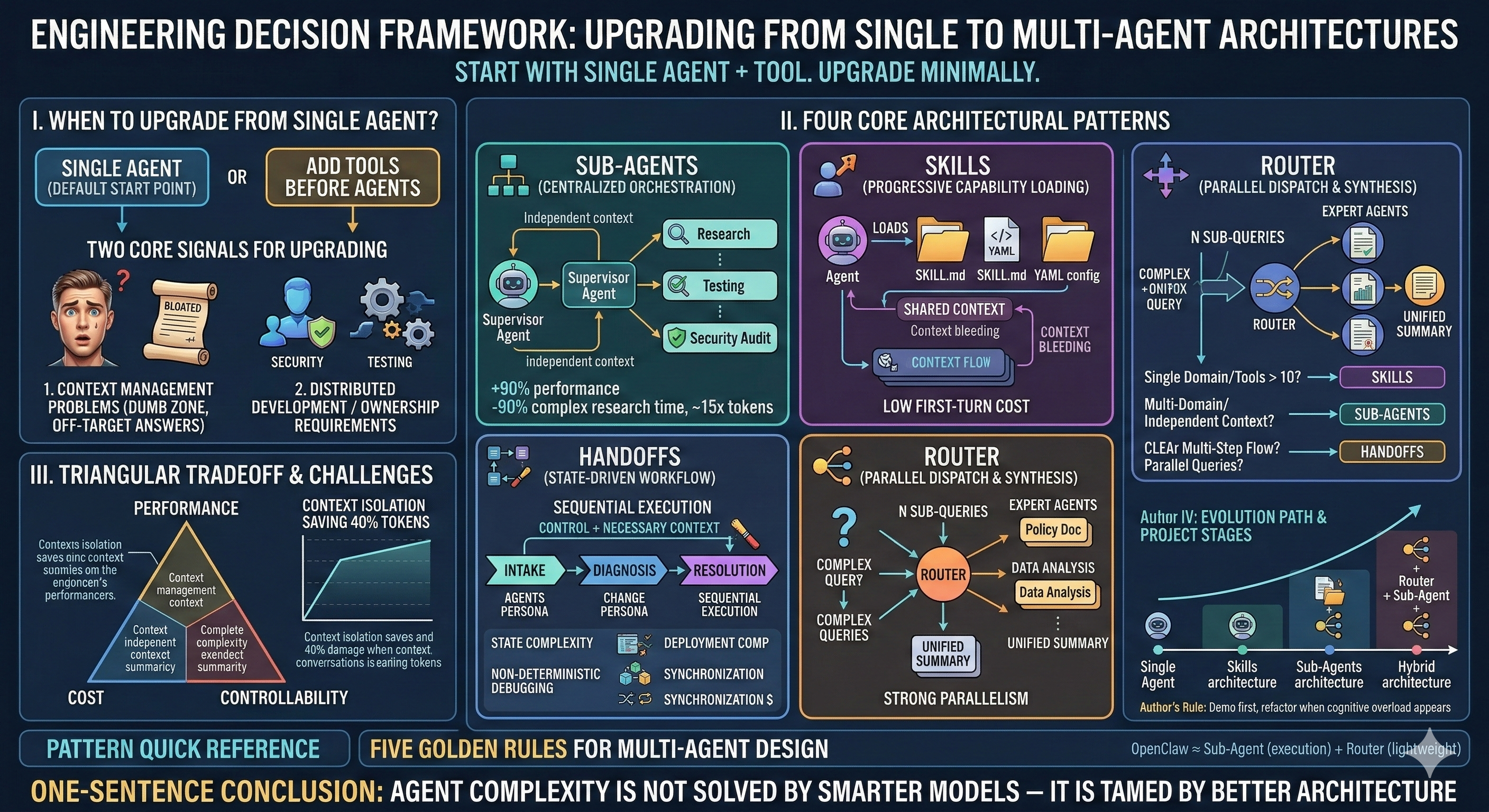
The main conversation is the only scheduler. It dispatches Locator, Analyzer, Fixer, Verifier in sequence; it aggregates parallel explorer results; it decides when to pause for human review. This architecture ensures:
- Permissions can't be bypassed through nested spawning
- Errors are precisely located to the failing stage
- Human-in-the-loop (HITL) intervention points are clear and predictable
When a sub-agent needs specialized knowledge, preload it via the skills field in its config — not by spawning another sub-agent internally.
Human Approval in Pipelines
The main conversation can operate in three modes depending on risk tolerance:
| Mode | When to Use |
|---|---|
| Fully automated | Low-risk, well-tested pipelines |
| Key-stage approval (recommended) | Pause at Analyzer → Fixer transition — the read-to-write boundary, highest risk |
| Stage-by-stage approval | High-risk changes to production systems |
When a pipeline fails, don't send the output back to Fixer for a retry. Send it to Analyzer with the new evidence (test failure output, error traces) for re-diagnosis. Blindly retrying execution without updating the analysis creates loops.
Retry limits: Same stage failing > 2 times → stop and reassess. Full pipeline rollback > 1 time → deeper human analysis or additional context needed.
Resuming Sub-Agents
After completion, each sub-agent has an agent ID. Resuming a sub-agent continues work in its preserved context — useful for long tasks, multi-day work, or asynchronous approval flows.
Token and Cost Considerations
Sub-agents add overhead: task prompt, context initialization, and result return. Expect 30–200% higher token usage compared to direct main-thread execution. However:
- Sub-agents enable targeting cheaper models for appropriate tasks —
haikufor pattern matching,sonnetfor reasoning - Context isolation prevents the main context from inflating with noise
- System-level total cost can be lower for complex, multi-phase tasks where isolation saves repeated re-reading
Decision rule: Simple, low-noise tasks → handle in the main conversation. Complex, noisy, or multi-phase tasks → sub-agents.
Frontier Insight ②: Context Isolation = Divide-and-Conquer Algorithm for Attention
1. Core Methodology
- Classic Divide-and-Conquer: Large problem → Split into small sub-problems → Solve individually → Merge results
- Sub-Agent Isolation: Large context window → Split into small context segments → Infer individually → Merge summaries
2. Measured Attention Compression Ratio
- Sub-Agent completes exploration with 50,000 internal tokens consumed → returns a 1,500-token summary
- Compression ratio = 33:1, with zero attention consumption for the main Agent
3. Google Research Quantitative Validation
- Independent multi-Agent setup (no isolation): Error amplified by 17.2 times
- Centralized coordination setup (with isolation): Error controlled at 4.4 times
- Parallel task performance improved by +80.9%, while serial reasoning performance degraded by 39% to 70%
4. Token Economics
- Single Agent with 6 rounds of conversation: ~180,000 input tokens
- Three-Agent pipeline: ~138,000 input tokens (over 23% token savings)
5. Decision Rules
- Context length < 5K: No splitting, as SP overhead is not cost-effective
- Intermediate output > 500 tokens: Splitting is required, as attention has been contaminated