Appearance
The Agent Memory File: Your Codebase's Constitution
Last updated: 2026-07-27
"The gap between 'Claude, we use pnpm' every session and 'Claude already knows' is the difference between a tool and a teammate."
- The Agent Memory File: Your Codebase's Constitution
- Part 1: What AGENTS.md Is and Why It Matters
- Part 2: Principles of Writing an Effective Memory File
- Principle 1: Less Is More
- Principle 2: Be Specific, Not Generic
- Principle 3: Encode Style Through Tooling, Not Instructions
- Principle 4: Organize by WHY → WHAT → HOW
- Principle 5: Progressive Disclosure — Don't Cram Everything In
- Principle 6: Provide Alternatives, Not Just Prohibitions
- Principle 7: Use /init as a Living Sync, Not a One-Time Setup
- Principle 8: Use Hierarchical CLAUDE.md for Monorepos
- Principle 9: Refactor Repetition into Skills
- Principle 10: Build Domain Templates for Fast Project Bootstrap
- Meta-Principle: Adoption Order
- Part 3: Layered Memory Management
- The Five-Layer Architecture
- Layer 1: Organization Policy
- Layer 2: User-Level Preferences
- Layer 3: Project-Level Shared Rules (most important)
- Layer 4: Local Workspace Memory
- Layer 5: Conditional Rules Directory
- The Sixth Layer*: Auto Memory
- Maintaining Memory Over Time
- The Bigger Picture: Prompt → Context → Agent Engineering
Part 1: What AGENTS.md Is and Why It Matters
The Core Problem
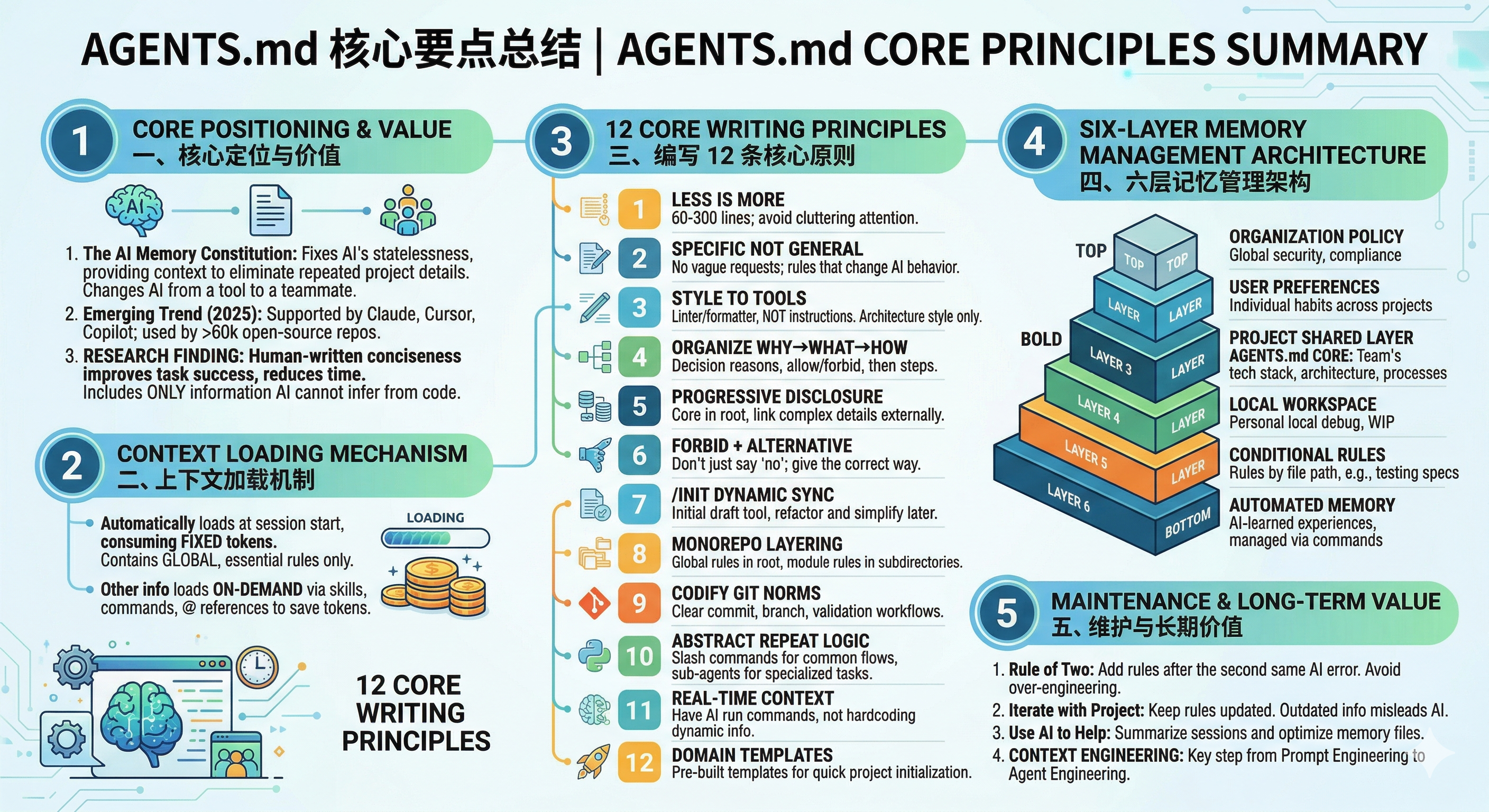
LLMs are stateless. Every new session starts blind—your agent knows nothing about your tech stack, naming conventions, or the fact that refactoring the auth module will break three downstream services. AGENTS.md (or CLAUDE.md in Claude Code) is the file that fixes this: a persistent briefing document read at the start of every conversation, giving the agent context it cannot infer from code alone.
The format emerged in mid-2025 and is now supported by Claude Code, Cursor, GitHub Copilot, Gemini CLI, Windsurf, Aider, Zed, Warp, and others—maintained by the Agentic AI Foundation under the Linux Foundation. Over 60,000 public repos contain context files; OpenAI's own monorepo has 88. Anthropic's CLAUDE.md adds hierarchical scoping, auto-memory, and import syntax on top of the same concept.
How Context Gets Loaded
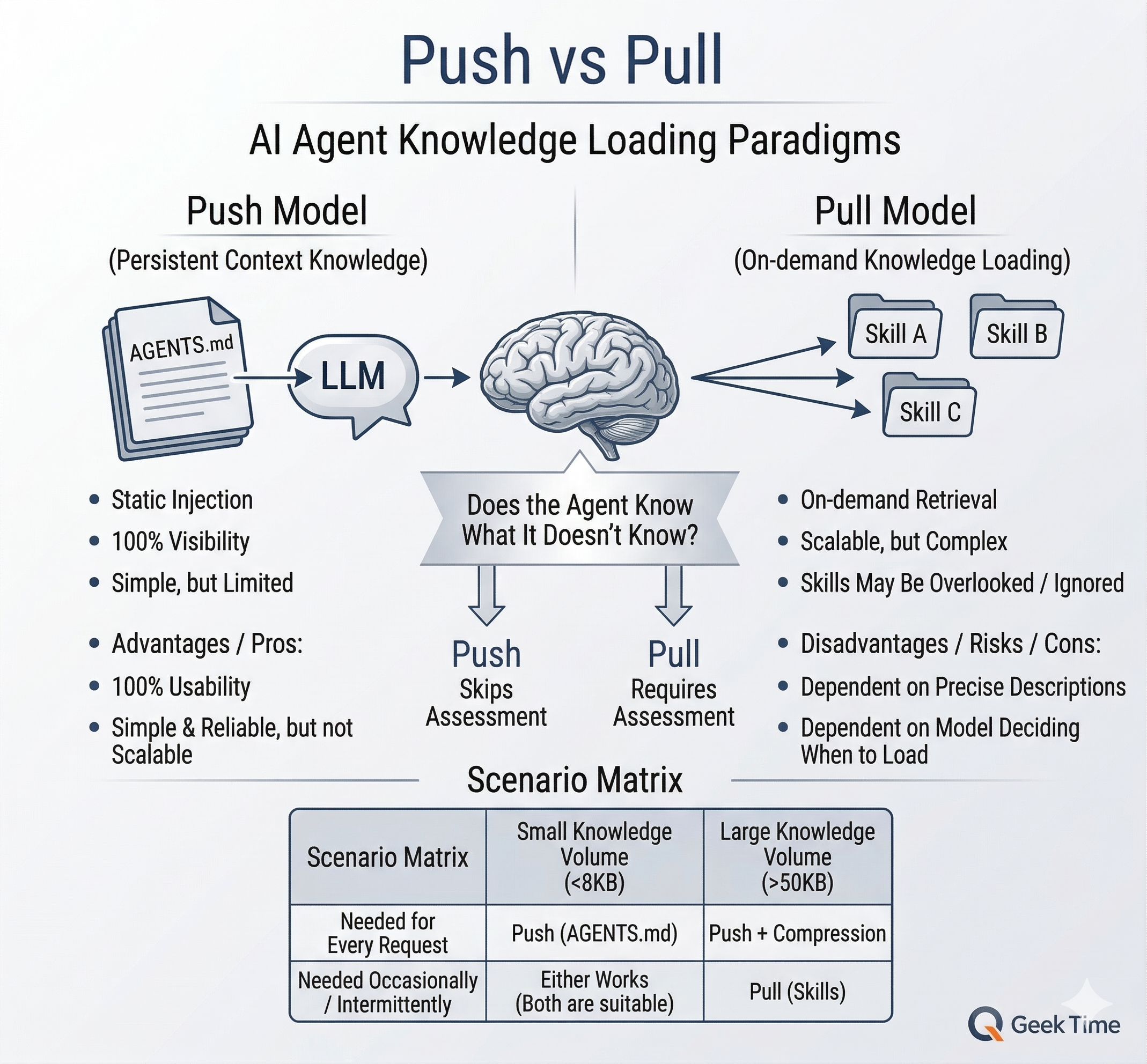
AGENTS.md is one of four mechanisms that bring information into an agent's context window. Understanding when each is loaded determines what belongs where:
| Mechanism | Load Timing | Token Cost | Best For |
|---|---|---|---|
| AGENTS.md | Auto-loaded at every conversation start | Always consumed | Core conventions, must-know constraints |
| Skills | Loaded on-demand when task matches | On-demand | Domain-specific knowledge |
| Commands | Loaded when user invokes /command | On-demand | Standardized repeatable workflows |
| @ references | Loaded when manually cited in a prompt | On-demand | Temporary reference material |
The implication: put in AGENTS.md only what every session needs. Everything else belongs in skills, commands, or @-referenced docs—loaded only when relevant, costing tokens only when used.
Part 2: Principles of Writing an Effective Memory File
Principle 1: Less Is More
Frontier LLMs can reliably follow ~150–200 instructions; Claude Code's system prompt already uses ~50. Every line in AGENTS.md competes for the remaining budget. LLMs also exhibit U-shaped attention—strong at the beginning and end of context, weak in the middle. A bloated file means your most important rules get lost in paragraph 6 of 12.
The ETH Zurich (2026): "Evaluating AGENTS.md" was the first rigorous empirical test—138 real-world tasks, four coding agents, three conditions. The findings:
- LLM-generated context files hurt: success rates dropped ~2–3%, costs rose 20%+.
- Human-written files helped marginally: +4% success, but also +19% cost.
- The root cause: auto-generated files were redundant with information already in the repo. When all existing docs were stripped first, LLM-generated files improved performance by 2.7%.
A concurrent study (Lulla et al., ICSE JAWs 2026) found AGENTS.md reduced wall-clock time by 28.64%—but measured efficiency, not correctness. Faster ≠ more correct.
The takeaway: write one that contains only what the agent cannot discover on its own.
Addy Osmani's filter: Can the agent figure this out by reading your code? If yes, delete it.
Directory trees, tech stack obvious from
package.json, test locations—all noise. What belongs: non-obvious tooling choices (uvoverpip), hidden constraints, custom commands, architectural rationale, dangerous operations.
Practical target: 60–300 lines. One team allocates a "max token count" per tool's documentation like ad space—if you can't explain it concisely, it's not ready for AGENTS.md.
Principle 2: Be Specific, Not Generic
The job of AGENTS.md is not to restate universal engineering advice. Its job is to encode project-specific decisions the agent cannot reliably infer from the codebase or its own default behavior. A good instruction narrows ambiguity: it tells the agent which path to take when multiple reasonable options exist.
That usually means writing rules in terms of concrete defaults, boundaries, locations, and exceptions. "Be careful with errors" is too generic. "Controllers catch and format; services throw" is actionable because it changes how the agent structures the code. If a rule would still be true in almost any repository, it probably does not belong here.
Too generic (zero incremental value):
markdown
- Write high-quality code
- Use meaningful variable names
Misplaced (better handled by tooling):
markdown
- Use 2-space indentation
- Always use semicolons
Specific (constrains implementation choices):
markdown
## Error Handling
- All errors extend `AppError` from `src/errors/base.ts`
- Services throw; controllers catch and format
- Never catch silently—always `logger.error()` at minimum

## Database Access
- All queries via Prisma ORM—never raw SQL in services
- Complex queries in `src/repositories/` only
- Transactions via `prisma.$transaction()` exclusively
Rule of thumb: if deleting the line would not change what the agent does, delete the line.
Principle 3: Encode Style Through Tooling, Not Instructions
Never send an LLM to do a linter's job—LLMs are slower, more expensive, and less reliable than deterministic formatters. Configure Prettier/ESLint/Black/rustfmt, then add a single line or use hooks
Or better: set up a Claude Code hook that runs the formatter automatically after every edit. Save your AGENTS.md budget for decisions a linter can't enforce.
Where style instructions do belong: decisions that are semantic, not syntactic. "Use interface for public contracts, type for internal unions" isn't formatting—it's architectural intent. "Functions with >3 parameters must use an options object" changes API shape, not whitespace.
Principle 4: Organize by WHY → WHAT → HOW
WHY — reasoning behind decisions (helps the agent generalize to novel cases):
markdown
## Why Zod
TS only validates at compile time. APIs receive external data at runtime.
Zod provides runtime validation + TS types + friendly errors. Apply the
same principle to any external data boundary.
WHAT — allowed vs. forbidden, stated as constraints:
markdown
## Allowed: Prisma for all DB ops, Zod co-located with routes
## Forbidden: `any` type, direct `fetch()`, `console.log`
HOW — step-by-step workflows with file references:
markdown
## Adding a New API Endpoint
1. Schema → `src/routes/<feature>/schema.ts`
2. Route → `src/routes/<feature>/route.ts`
3. Service → `src/services/<feature>.service.ts`
4. Repository → `src/repositories/<feature>.repo.ts` (if needed)
5. Tests → `src/routes/<feature>/__tests__/`
6. Run `make check`
Principle 5: Progressive Disclosure — Don't Cram Everything In
AGENTS.md is the entry point, not the encyclopedia. Keep core rules in the root file; link to detailed docs elsewhere.
markdown
## Deep Dives
- For API patterns and response format: `docs/api-patterns.md`
- For database migration workflow: `docs/migrations.md`
- If you encounter a FooBarError: `docs/troubleshooting.md`
Important: Don't just list paths—pitch the agent on when to read them. "For complex Prisma usage or if you encounter a migration error, see docs/database.md" is far more effective than a bare reference.
You can also use @ file references in prompts to point the agent at exact sources of truth without bloating AGENTS.md:
Update user.py according to @docs/api-spec.mdPrinciple 6: Provide Alternatives, Not Just Prohibitions
Rules that only say "don't" often leave the agent at a dead end. AGENTS.md works better when it not only blocks the wrong move, but also points to the preferred one. A prohibition without an alternative creates hesitation; a prohibition paired with a replacement creates a workflow.
This matters because agents are action-oriented. If you forbid a common shortcut, unsafe command, or architectural pattern, you should also specify the approved substitute and, ideally, why it is safer. The goal is not just to prevent mistakes, but to preserve momentum while keeping the agent inside your team's guardrails.
markdown
# Bad — blocks an action without giving a path forward
- Never use `--force` with git push

# Good — forbids the risky option and supplies the safe one
- Never `git push --force` → use `git push --force-with-lease`
  (prevents overwriting others' work)
Rule of thumb: every "don't" should come with a corresponding "do instead."
Principle 7: Use /init as a Living Sync, Not a One-Time Setup
/init auto-generates a draft CLAUDE.md by scanning your project. Treat it as a starting point, not the finished product.
- Run it after major refactors to catch structural changes.
- Choose "Merge" to preserve manual edits + append new structure, or "Replace" to restart.
- Always review and prune afterward—
/initgenerates exactly the kind of redundant content the ETH Zurich study warns about (file trees, obvious stack info). Delete what the agent can discover on its own.
Principle 8: Use Hierarchical CLAUDE.md for Monorepos
Push global rules up, push specifics down. Each folder can have its own CLAUDE.md that layers on top of the root:
/root
  CLAUDE.md              → global: Git workflow, shared standards
  backend/CLAUDE.md      → Python, FastAPI, backend patterns
  frontend/CLAUDE.md     → React, Tailwind, component conventions
  data/CLAUDE.md         → analysis defaults, viz libraries
When you work inside frontend/, the agent loads both the root and local files. This keeps each file lean and context-relevant—the frontend agent never loads backend database rules.
Principle 9: Refactor Repetition into Contexts / Skills
When a workflow, checklist, or body of domain knowledge keeps reappearing across tasks, it no longer belongs inline in prompts or AGENTS.md. Refactor it into a Skill. Skills are the right home for reusable expertise because they load on demand, stay out of the base context, and can bundle instructions, references, and helper scripts around a clearly named task.
This is the modern division of labor: AGENTS.md holds always-on project constraints; Skills hold reusable know-how for specific classes of work. Commands are separate from Skills: commands are explicit user-invoked entry points, while Skills are knowledge the agent can pull in when relevant. Sub-agents are separate again: they provide isolation and role specialization, and they can themselves load Skills when they need that expertise.
The same logic applies to changing information. If the agent needs live context such as the current database schema, API spec, deployment state, or vendor docs, do not freeze that into AGENTS.md either. Instead, give the agent a way to fetch it: a Skill that teaches the lookup workflow, an MCP server for structured access, or ordinary CLI tools such as curl, project scripts, and local inspection commands. If the information changes faster than you will maintain the memory file, teach the agent how to retrieve it instead of writing it down.
A practical test: if you keep pasting the same review rubric, migration checklist, release procedure, or Git workflow guidance, promote it into a Skill instead of expanding AGENTS.md.
markdown
# .claude/skills/git-workflow/SKILL.md
Use this skill when preparing commits, branches, or pull requests.

## Rules
- Commit after each logical feature or fix
- Write commit messages as `<type>(<scope>): <description>`
- New features go on branches; never push directly to `main`
- Run `make check` before committing
You can also make live context discoverable from AGENTS.md without embedding the live data itself:
markdown
## Live Context
- Run `python manage.py show_schema` to inspect current DB schema
- Run `curl -s http://localhost:8000/openapi.json` for current API spec
- Run `cat .env.example` for available environment variables
For a full treatment of when to use Skills, how they relate to Commands and SubAgents, and how to structure them well, see the later chapter on Skills. For deeper discussion of tool-based access patterns, see the later chapters on Skills, MCP, and Building Tools.
Principle 10: Build Domain Templates for Fast Project Bootstrap
For recurring project types, create a template AGENTS.md that encodes your personal "operating system." Clone and tweak rather than starting from scratch.
Example for data science projects:
markdown
## Language
- Conversation: Traditional Chinese
- Code and comments: English

## Python Standards
- 4-space indentation, pytest over unittest
- All functions have type hints and docstrings
- Prefer f-strings, pathlib over os.path

## Analysis Defaults
- Use plotnine for visualization (set figure size + DPI)
- Check assumptions before statistical tests (VIF for multicollinearity)
- Always include EDA before modeling
Meta-Principle: Adoption Order
Don't over-engineer day one. Tighten the system where it hurts most:
- Start with
@references to ground the agent in specs and schemas. - Add core rules (architectural constraints, git discipline, key commands).
- When guidance keeps repeating: factor it into Skills; use Commands only for explicit user-invoked entry points.
- When tasks need isolation or role specialization: carve out sub-agents, and let them load Skills as needed.
- When the agent needs live or changing context: expose it through Skills, MCPs, or ordinary CLI tools instead of embedding snapshots in AGENTS.md.
- When starting new projects: layer in domain templates.
Part 3: Layered Memory Management
The Five-Layer Architecture
Agent memory isn't a single file—it's a layered system where each level serves a different audience and scope.
┌─────────────────────────────────────────────┐
│  Layer 1: Organization Policy (IT/DevOps)   │  Broadest scope
├─────────────────────────────────────────────┤
│  Layer 2: User Preferences (personal)       │
├─────────────────────────────────────────────┤
│  Layer 3: Project Rules (team, in git)      │  ← Most important
├─────────────────────────────────────────────┤
│  Layer 4: Local Workspace (personal, local) │
├─────────────────────────────────────────────┤
│  Layer 5: Conditional Rules (per-context)   │  Narrowest scope
└─────────────────────────────────────────────┘
        ↕
   Auto Memory (learned, accumulates over time)
Layer 1: Organization Policy
| Property | Detail |
|---|---|
| Location | macOS: /Library/Application Support/ClaudeCode/CLAUDE.md · Linux: /etc/claude-code/CLAUDE.md · Windows: C:\Program Files\ClaudeCode\CLAUDE.md |
| Audience | IT/DevOps, enforced globally |
| Contents | Security policies (no hardcoded secrets, HTTPS required), compliance (no PII in logs), prohibited patterns (no unapproved libraries, no direct prod DB access) |
Enterprise-only. Small teams can skip it.
Layer 2: User-Level Preferences
| Property | Detail |
|---|---|
| Location | ~/.claude/CLAUDE.md |
| Audience | You, across all projects |
| Contents | Communication preferences, personal coding style, preferred tools |
Your defaults. Overridden by project-level rules when they conflict.
Layer 3: Project-Level Shared Rules (most important)
| Property | Detail |
|---|---|
| Location | CLAUDE.md or AGENTS.md at project root (in git) |
| Audience | The entire team |
| Contents | Tech stack, project structure, coding standards, key commands, architectural decisions |
This is the layer Parts 1 and 2 focus on. Template:
markdown
# AGENTS.md

## Project Overview
[1–2 sentences]

## Tech Stack
[Only what's non-obvious]

## Key Commands
[Exact commands: dev, test, lint, build]

## Architecture Decisions
[WHY + WHAT for each]

## Workflow: How to Add [Feature/Endpoint/Component]
[Step-by-step with file paths]

## Forbidden Patterns
["Don't X → do Y instead"]
Layer 4: Local Workspace Memory
| Property | Detail |
|---|---|
| Location | CLAUDE.local.md at project root (in .gitignore) |
| Audience | You, for this project |
| Contents | Local env config, test accounts, current WIP, personal TODOs, debugging tricks |
A persistent "work journal" between you and the agent. Maintain it manually or ask: "Summarize what we figured out about the payment bug and add it to CLAUDE.local.md."
Layer 5: Conditional Rules Directory
| Property | Detail |
|---|---|
| Location | .claude/rules/*.md |
| Audience | The agent, loaded only when matching files are edited |
| Contents | Testing standards, frontend rules, API design patterns |
Path-based scoping via YAML frontmatter:
yaml
# .claude/rules/testing.md
---
paths:
  - "src/**/*.test.ts"
  - "tests/**/*.ts"
---

## Testing Standards
- Vitest + React Testing Library
- Arrange → Act → Assert structure
- Test user behavior, not implementation
- 80% coverage for new modules
These only consume context when relevant—the implementation of progressive disclosure at the rules level.
The Sixth Layer*: Auto Memory
| Property | Detail |
|---|---|
| Location | ~/.claude/projects/<project-id>/memory/ |
| Contents | Patterns Claude learned from sessions: debugging paths, structural insights, project gotchas |
| vs. AGENTS.md | AGENTS.md = human-defined rules (input spec). Auto Memory = model-learned experience (adaptive insights). |
Manage with /memory commands:
/memory— view loaded memories and sources/memory edit— edit project-level CLAUDE.md/memory edit user— edit user preferences/memory edit local— edit local workspace
Or just tell the agent: "Add a rule to CLAUDE.md that we always use pnpm."
Maintaining Memory Over Time
Post-incident rule: the second time you correct the same agent behavior, codify it. Not the first (could be a fluke), not preemptively (leads to bloat).
Keep it in sync. Stale files describing replaced dependencies actively degrade performance. A file that says "we use Webpack" after you migrated to Vite is worse than no file.
The data-driven flywheel. Review agent CI/CD logs for common mistakes → feed patterns back into AGENTS.md → better performance → fewer mistakes. Bugs become rules become better code.
Use the agent to maintain itself:
"Summarize the key insight from our debugging session and
propose an addition to CLAUDE.md if it would prevent this
issue for future sessions."
The Bigger Picture: Prompt → Context → Agent Engineering
The evolution of AI-assisted development:
- Prompt Engineering — crafting individual prompts for single interactions.
- Context Engineering — designing the information architecture around the model. AGENTS.md lives here.
- Agent Engineering — designing specialized, reusable AI agents (sub-agents, skills, MCP tools) that compose into larger workflows.
AGENTS.md is the most accessible entry point to context engineering. But it's not the end state—emerging approaches like the ACE framework (ICLR 2026) generate task-specific context dynamically, outperforming static files by 12.3%.
For now: a lean, human-written, regularly maintained memory file that contains only what the agent can't discover on its own is a small investment with compounding returns.
Further reading:
- ETH Zurich (2026): "Evaluating AGENTS.md" — First empirical benchmark study
- Lulla et al. (ICSE JAWs 2026) — The efficiency counterpoint
- Anthropic: Claude Code Best Practices — Official CLAUDE.md guidance
- Addy Osmani: "Stop Using /init for AGENTS.md" — Practical filter for context files
- "Memory in the Age of AI Agents: A Survey" (Tsinghua, 2025) — Academic survey of agent memory
Next up: You now know how to prompt agents and give them persistent memory. But how do these agents actually work? In Chapter 2: Anatomy of Coding Agents, we open the black box — understanding the agent loop, autonomy levels, and failure modes will make every technique in this chapter more effective.