Appearance
Claude Code as an AI Agent Framework
Last updated: 2026-07-27
In How Coding Agents Work, you learned that every coding agent rests on three pillars: a system prompt, tools, and a context strategy. This chapter zooms into one agent — Claude Code — and shows how those pillars become a four-layer, programmable architecture. Why Claude Code specifically? Because it is the most fully-realized open-architecture agent framework available today, and its design maps directly to the general principles: System Prompt → Memory layer, Tools → Extension layer, Context Strategy → the entire stack working together. Master Claude Code's architecture, and you build transferable intuition for any agent system you encounter next.
This chapter reframes your understanding of Claude Code — not as a chat tool, but as a programmable, extensible, composable AI agent framework with a layered technical architecture.
From User to Operator: A Paradigm Shift
Not Just an AI Assistant — A Programmable Platform
Most people think of Claude Code as "ChatGPT in a terminal" or "a tool that writes code." That undersells it dramatically.
The better analogy is VS Code. On the surface, VS Code is a text editor. In reality, it's an extensible platform — the editor is just the entry point for a universe of extensions, workflows, and integrations. Claude Code works the same way: the conversational interface is the entry point, but underneath lies infrastructure for building AI-powered engineering workflows.
Claude Code can read entire repositories, modify code, run tests, operate system tools, and orchestrate automated pipelines — far beyond "writing a few functions."
Core capabilities of ClaudeCode
| Capability Dimension | OpenCode | Claude Code | Cursor | Gemini CLI | Antigravity | OpenAI Codex | Coder | Qwen (Tongyi Qianwen) |
|---|---|---|---|---|---|---|---|---|
| Memory | AGENTS.md | CLAUDE.md | .cursorrules | GEMINI.md | Project-level Rules/.agent/rules configuration | SKILL.md / Project-level configuration file | Workspace persistent configuration | Project-level rule configuration / RAG knowledge base persistence |
| Sub-Agents Delegation | Native support | Native support | Composer | Native support (v0.38.1+) | Native support (multi-agent parallel) | Native support | Native support | Supported via Qwen-Agent framework |
| Skills | Native support | Native support | Custom commands | Native support (Agent Skills) | Native support (Agent Skills) | Native support | Custom commands / Agent templates | Native support (Agent Skills / Custom tools) |
| Hooks Events | Native support | Native support | Limited | Native support | Limited support | Native support | Limited support | Limited support |
| MCP Protocol | Native support | Native support | Partial support | Native support | Native support | Native support | Native support | Native support |
| Headless CI/CD | Native support | Native support | Not supported | Native support | No native support | Native support | Native support | Partial support |
Two Paradigms of Interaction
| User Paradigm | Operator Paradigm | |
|---|---|---|
| Interaction | You ask → Claude answers → you execute | You configure the agent → it works autonomously → tasks complete automatically |
| Essence | A "fancy calculator" — ask and receive, one-off capability calls | You design rules, workflows, and responsibility boundaries; Claude executes within constraints |
| Your role | Questioner | System designer + pilot |
The goal of this chapter: take you from questioner to system designer.
The Engine Under the Hood: Agentic Loop and Unix-Style Primitives
Before we look at the four-layer architecture, we need to understand the fundamental mechanism that makes Claude Code an agent rather than a chatbot.
The Agentic Loop: From Advisor to Engineer
Without tools, Claude is an advisor — it can analyze, suggest, and explain, but it cannot act. It cannot read your codebase, modify a file, or run a test. Every interaction dead-ends in "now go do this yourself."
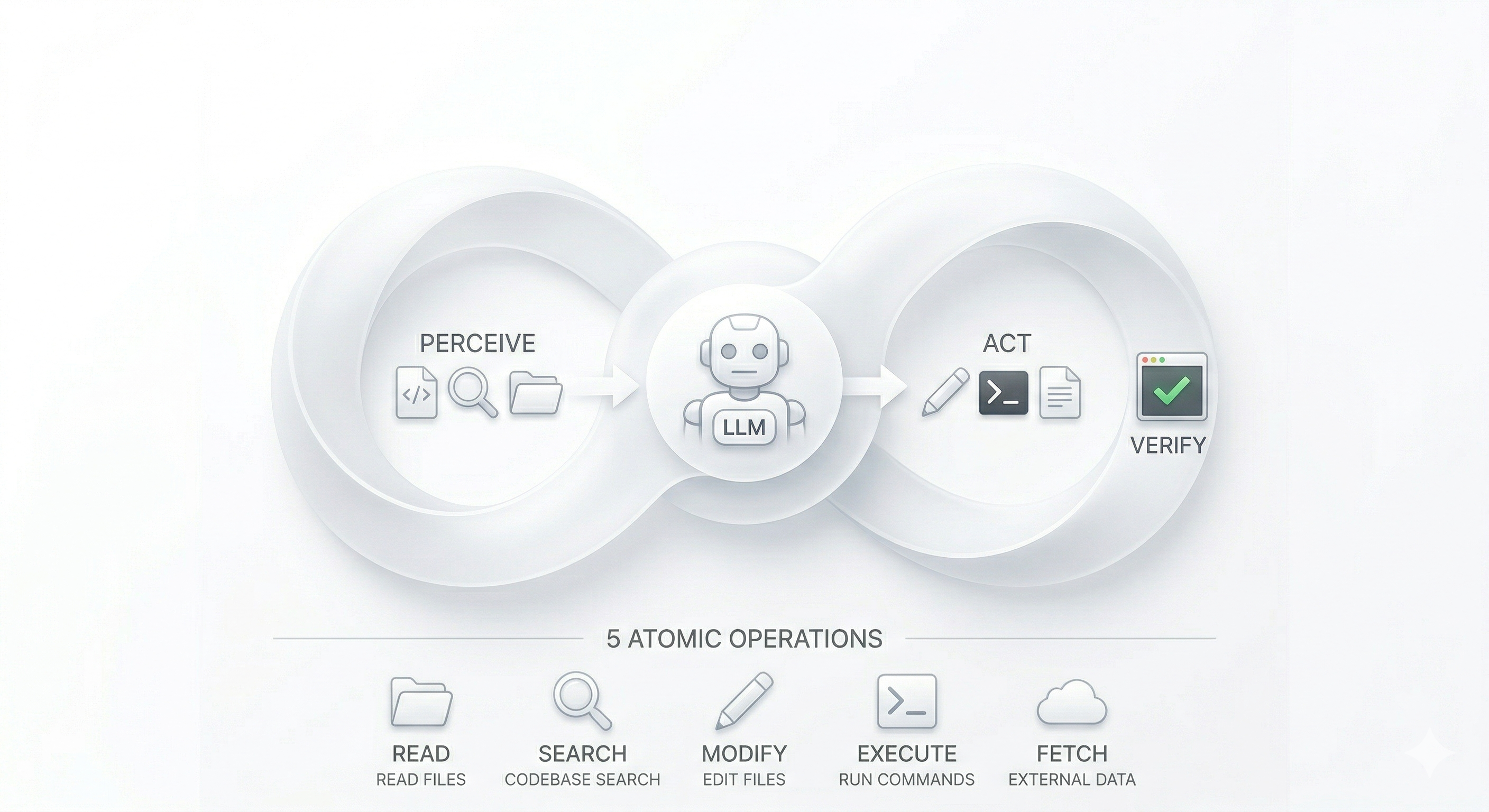
Tools transform Claude into an engineer. They create an Agentic Loop — a continuous cycle of perception, action, and verification:
- Perceive — Read files, search codebases, gather context (Read, Glob, Grep)
- Act — Modify code, execute commands, create artifacts (Edit, Write, Bash)
- Verify — Run tests, check outputs, assess results (Bash, Read)
A simple bug fix might complete in one cycle. A complex refactor might loop dozens of times — reading a file, editing it, running tests, reading the failure, editing again — with Claude's reasoning driving each transition. The role division is clear:
- Claude (the model) — decides what to do next: understands, reasons, decomposes tasks
- Tools (the primitives) — execute against the environment: read files, run commands, modify code
- Claude Code (the harness) — binds model and tools together, providing the execution environment, context management, permission control, and orchestration infrastructure
That harness is the foundation everything else is built on.
Five Atomic Operations and the Unix Philosophy
Claude Code does not ship a "refactoring tool," a "debugging tool," and a "deployment tool." Instead, it provides a small set of primitive operations — and trusts that complex behaviors will emerge from their composition with LLM reasoning.
Every development task decomposes into five atomic operations:
| Operation | What a developer does | Primitive tool |
|---|---|---|
| Perceive | Open a file, read code | Read |
| Search | Find definitions, trace call chains | Glob, Grep |
| Modify | Fix a bug, refactor, update config | Edit, Write |
| Execute | Run tests, build, deploy | Bash |
| Fetch | Look up docs, query APIs, check external state | WebFetch, MCP tools |
This is the Unix philosophy applied to AI agents: small, sharp tools that do one thing well, composed through a universal interface. In Unix, that interface is text pipes. In Claude Code, it is the LLM's reasoning loop. You do not build a specialized tool for every scenario. You build primitives and let the intelligence layer compose them.
Consider a concrete example — fixing an intermittent login 500 error:
- Grep for
500/error/login→ locate relevant log lines and files - Read
auth-service.js→ spot a missing null check on line 87 - Grep for
validateToken→ find all callers to ensure a complete fix - Read the caller code → decide to fix at the source
- Edit the source file → add the null guard
- Bash
npm test --grep 'auth'→ a test fails - Edit the test file → update the expectation
- Bash
npm test→ all green
Each step is trivially simple — read a file, search for text, change a line, run a command. But composed through reasoning, they form a complete diagnose → fix → regress engineering workflow. "Refactoring," "debugging," and "deployment" are not hardcoded capabilities. They are emergent behaviors that arise from primitive composition.
Bash: The Universal Escape Hatch
In theory, Bash alone could do everything — cat for reading, sed for editing, find for searching. It is Turing-complete. So why keep the specialized primitives?
Three reasons that map directly to systems design principles:
- Structured interaction — Read returns content with line numbers and length control, optimized for LLM comprehension. Bash output is raw and noisy.
- Fine-grained permissions — You can allow Read but deny Bash, creating a "can look, cannot touch" security posture. Bash is all-or-nothing.
- Token efficiency — Specialized tools return exactly the information the model needs. Bash output carries overhead that wastes context window.
The design tension is intentional: Bash provides capability completeness; primitive tools provide efficiency, structure, and governability. This is the same trade-off Unix makes between raw syscalls and purpose-built utilities.
Three Layers of Tool Capability
This primitive-first design extends outward in three concentric layers:
| Layer | What it covers | Design role |
|---|---|---|
| Built-in primitives | Read, Edit, Bash, Grep, Glob, WebFetch | The foundation — covers most software engineering tasks |
| Bash-reachable tools | Any CLI, script, or system utility | The escape hatch — makes the agent Turing-complete |
| MCP extensions | Structured interfaces to external systems (databases, Jira, Slack) | The integration layer — structured I/O, tool discovery, and security isolation beyond what raw Bash provides |
Why add MCP when Bash can already curl any API? For the same reasons you keep Read instead of using cat: structured input/output (no parsing raw text), automatic tool discovery (connect an MCP server, all its tools register automatically), and security isolation (access control lives on the server side, not in a fragile Bash permission rule).
Tool Risk Levels and the Permission Model
Not all tools carry equal risk. Claude Code classifies tools by their potential blast radius and gates access accordingly:
| Risk level | Tools | Default behavior |
|---|---|---|
| Low (read-only) | Read, Glob, Grep | No approval needed — safe to run freely |
| Medium (local modification) | Edit, Write | Session-scoped approval — expires when the conversation ends |
| High (global execution) | Bash, some MCP tools | Persistent approval with explicit confirmation — because a shell command's blast radius is unbounded |
This graduated model serves three design purposes: it lets you assign minimal permission sets to different agents (a code-reviewer gets only read tools), it makes governance enforceable (high-risk tools pass through Hooks and approval gates), and it gives the permission prompts explainability — you understand why some actions require approval and others do not.
The tool layer — its primitives, its risk model, its layered extensibility — is the skeleton on which the four-layer architecture below is built.
The Four-Layer Architecture
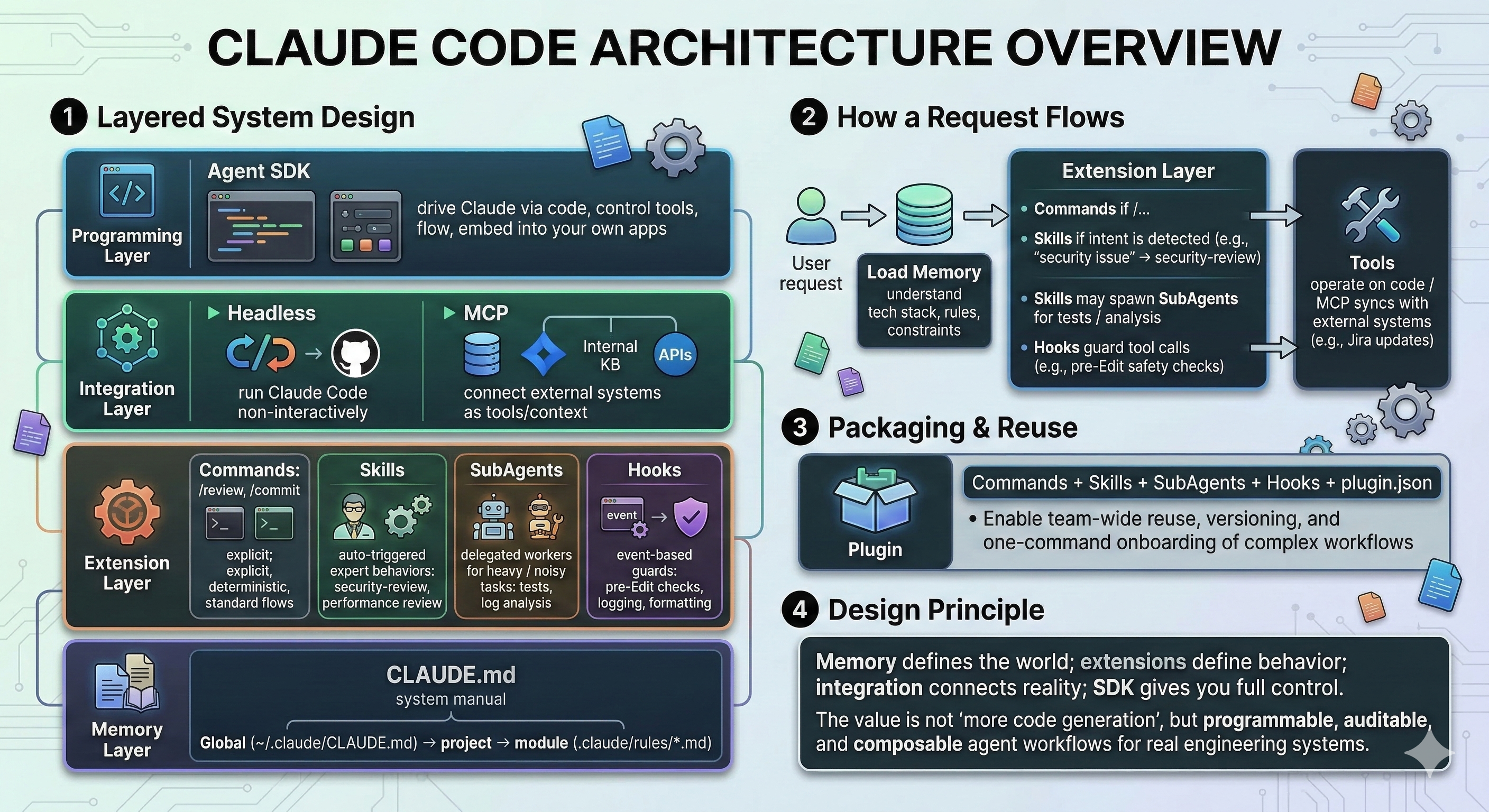
Claude Code's technical stack has four distinct layers, each with a clear responsibility:
| Layer | Purpose | Key Components |
|---|---|---|
| Foundation | Persistent memory and context | CLAUDE.md memory system |
| Extension | Capability center | Commands, Skills, SubAgents, Hooks |
| Integration | Connect to the outside world | Headless mode, MCP |
| Programming Interface | Code-level control | Agent SDK |
Layer 1: Foundation — The Memory System (CLAUDE.md)
Think of CLAUDE.md as an employee handbook for your AI colleague. Instead of re-explaining project conventions every conversation, you write them down once and Claude reads them automatically at the start of every session.
What Goes in CLAUDE.md
- Tech stack — languages, frameworks, key libraries
- Code style — naming conventions, formatting rules
- Critical rules — e.g., "never push directly to main," "always run tests before committing"
- Project context — architecture decisions, domain knowledge
Three-Level Memory Hierarchy
| Level | Path | Scope |
|---|---|---|
| Global | ~/.claude/CLAUDE.md | Universal rules across all projects |
| Project | <project-root>/CLAUDE.md | Project-specific constraints and context |
| Module | <project-root>/.claude/rules/*.md | Fine-grained rules for specific directories or modules |
Why This Matters
The memory system serves two critical functions:
- Externalizes tacit knowledge — transforms implicit team experience into structured documents, giving Claude a "worldview" before any task begins
- Provides a context baseline — all other components (Commands, Skills, SubAgents, Hooks) build on this shared foundation
But Claude Code's context strategy goes beyond static memory files. It uses aggressive front-loading (auto-summarizing prior conversation, detecting topic changes, loading project files) combined with just-in-time retrieval — dynamically fetching codebase content via grep and glob rather than pre-loading everything. When context approaches limits, the system auto-compacts — summarizing history while preserving key architectural decisions and recent file paths. This hybrid approach is what makes the Memory layer practical at scale.
Layer 2: Extension — Four Core Components
The extension layer is the capability center of Claude Code. It contains four components, each with a different trigger mechanism and use case.
A design principle worth noting: Claude Code doesn't use a single monolithic system prompt. Instead, it layers micro-prompts — small <system-reminder> tags injected throughout the conversation (before tool calls, after command outputs, inside tool results) — to reinforce constraints at the right moment. Similarly, command safety isn't governed by a hardcoded allowlist — a separate LLM prompt classifies whether each shell command looks suspicious, gating user approval. These implementation choices reflect the same philosophy as the four components below: small, well-timed, composable units rather than one massive configuration.
Commands (Slash Commands)
Explicit, deterministic, manually triggered standard procedures.
- Invocation: User types
/command(e.g.,/commit,/review) - Configuration: Defined in
.claude/commands/*.md - Characteristics: High determinism, reusable, auditable
- Best for: Operations that must execute the same way every time — standardized commit messages, fixed deployment flows, code review checklists
Skills
Domain-aware behavioral strategies that Claude activates through semantic reasoning.
- Invocation: User asks a natural language question; Claude automatically decides whether to activate a skill based on context
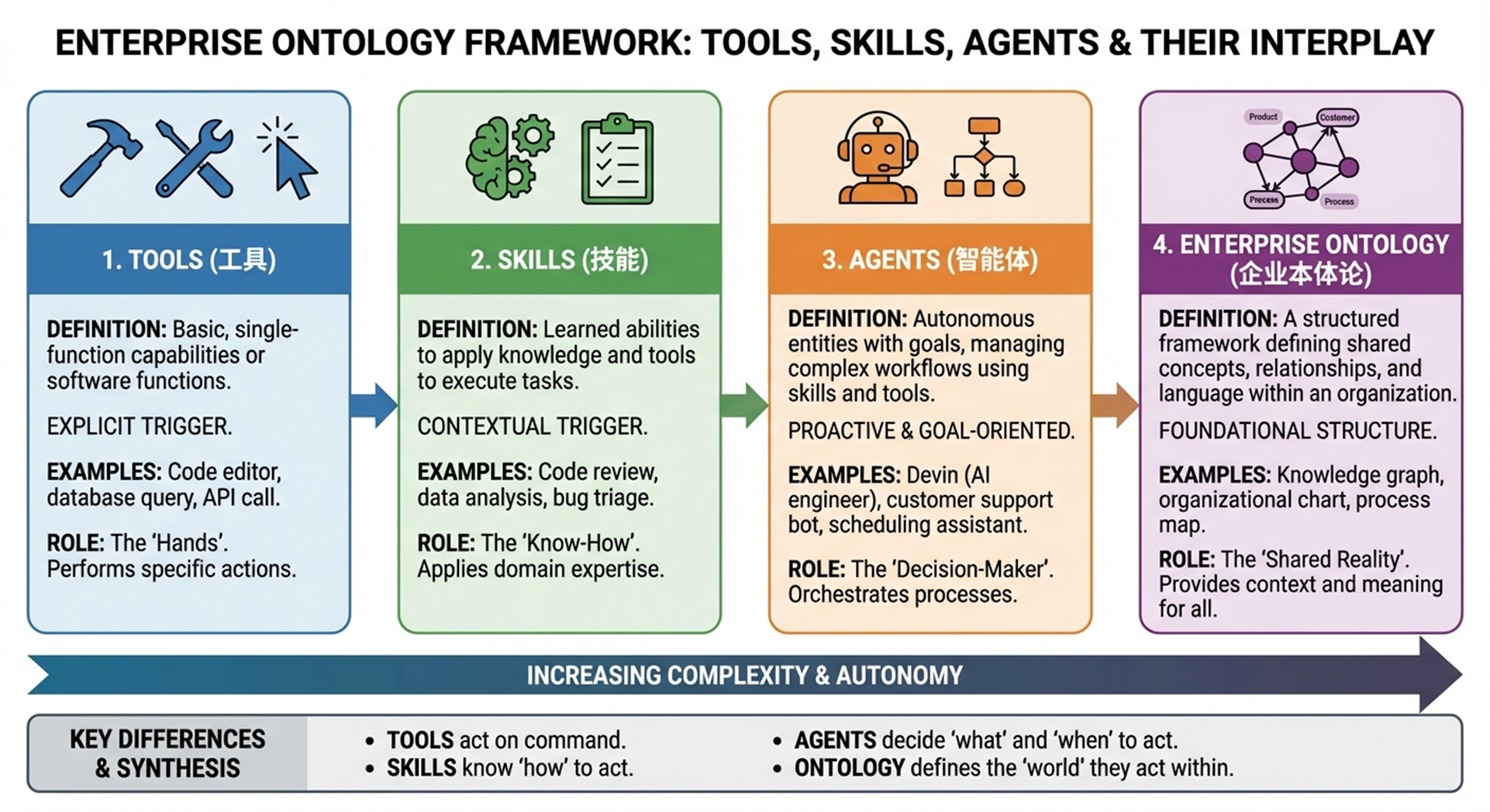
- Key distinction from Tools:
| Tools | Skills | |
|---|---|---|
| Question answered | "Can I do this?" | "Should I do this? How? To what depth?" |
| Contains | External capability interface (read files, call APIs) | Trigger logic + prompt strategy + tool orchestration |
| Behavior | Mechanical execution | Expert-level judgment |
- Best for: Tasks with strong domain requirements (security, architecture, performance) that need contextual judgment rather than keyword-matching
- Example: A
security-reviewskill adjusts its inspection focus and depth based on language, context, and risk level
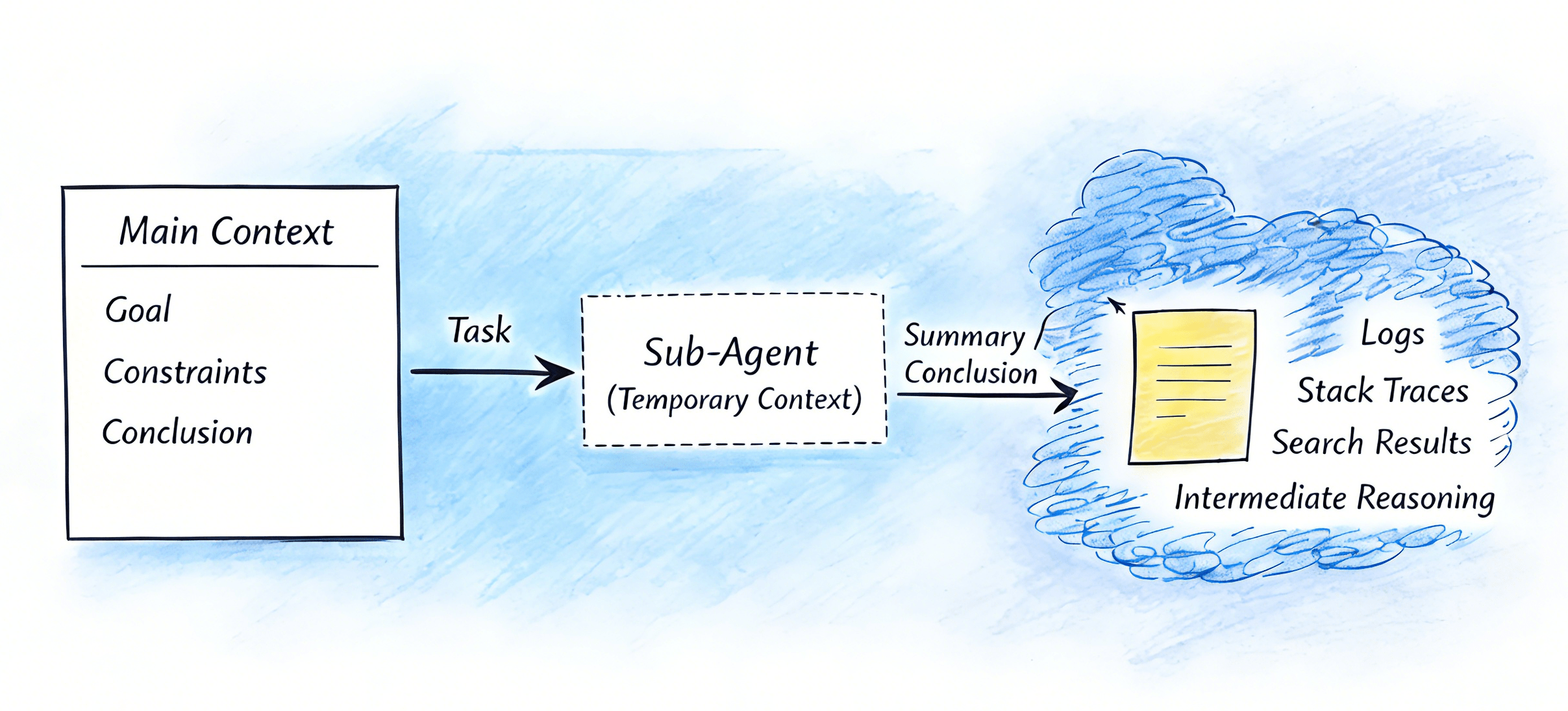
SubAgents
Independent execution units dispatched by the primary agent for specialized tasks.
- Invocation: Claude automatically decides to spawn a sub-agent, or the user explicitly requests one
- Best for:
- High-noise tasks — extracting anomalies from massive logs, searching through large document sets
- Permission isolation — a sub-agent with access to only specific tools, reducing risk
- Parallel execution — pipeline nodes like
test-runner,log-analyzer,code-reviewerrunning concurrently
Hooks
Event-driven automated gatekeepers and auxiliary scripts.
- Invocation: Triggered automatically by specific events (e.g., "before the Edit tool executes")
- Core purpose: Insert checks, logging, or supplementary actions before/after specific operations
- Examples:
- Pre-edit hook: Run a security scan before code modification; block and alert if sensitive changes are detected
- Auto-format code, auto-write logs, auto-audit critical operations
- Best for: Any "must execute 100% of the time" gatekeeper logic — security reviews, compliance checks, formatting enforcement
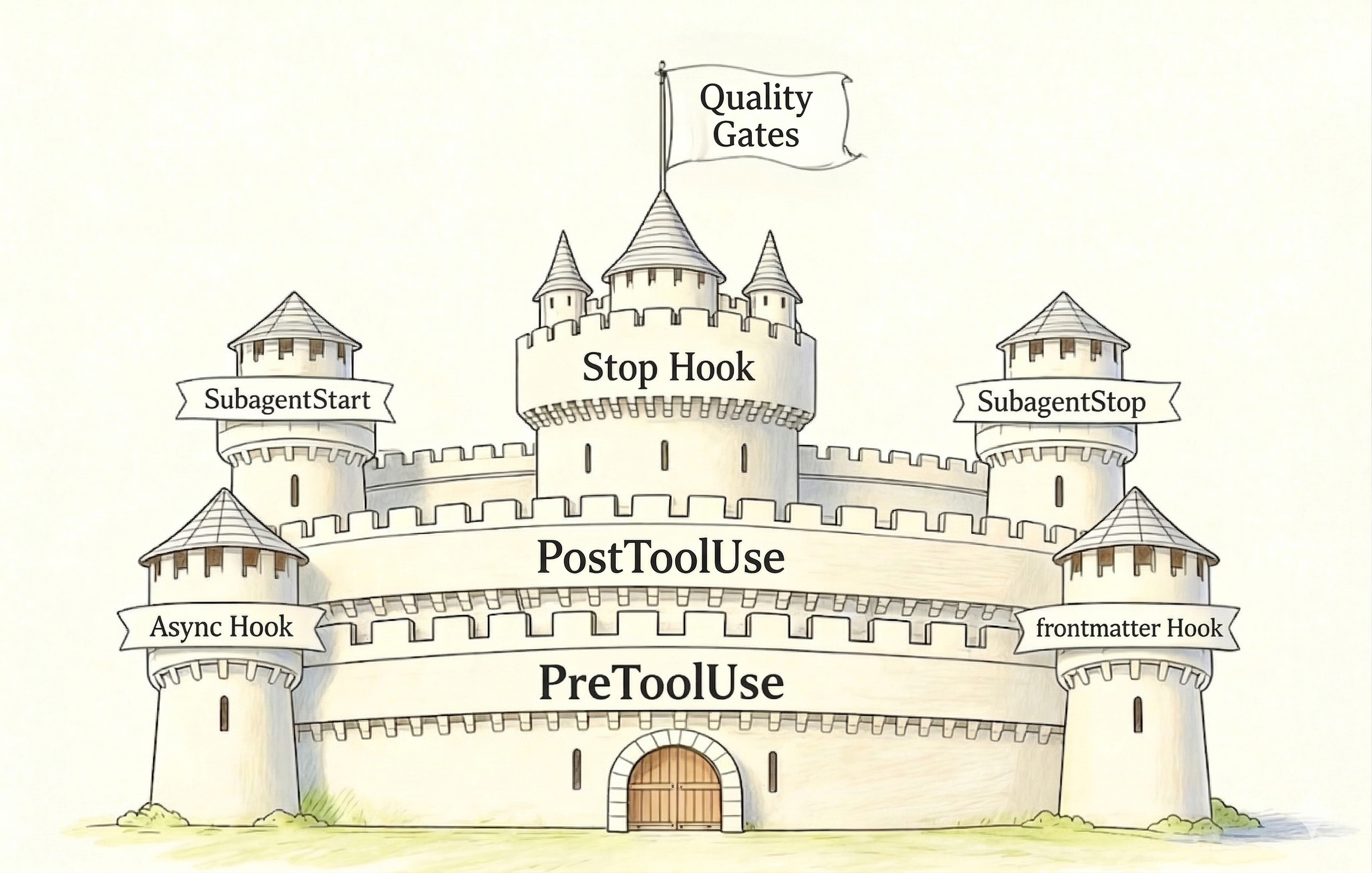
The "separation of powers" principle: Commands define behavior, SubAgents execute, Hooks guard — together they form a checks-and-balances system.
Layer 3: Integration — Connecting to the Outside World
Headless Mode
Fully automated, zero-interaction execution.
- Typical usage: Call Claude in CI/CD pipelinesbash
# In a GitHub Actions workflow claude --headless "Fix all linting errors in src/" - Use cases: Automated code review, auto-fix, changelog generation, release notes
- Key shift: Claude Code becomes an intelligent node in your pipeline, not a manually triggered assistant
MCP (Model Context Protocol)
Expose external systems as tool interfaces that Claude can invoke.
- Connects to: Databases, Jira, internal knowledge bases, custom APIs
- Data flow: Claude → MCP → External System (query, write, orchestrate)
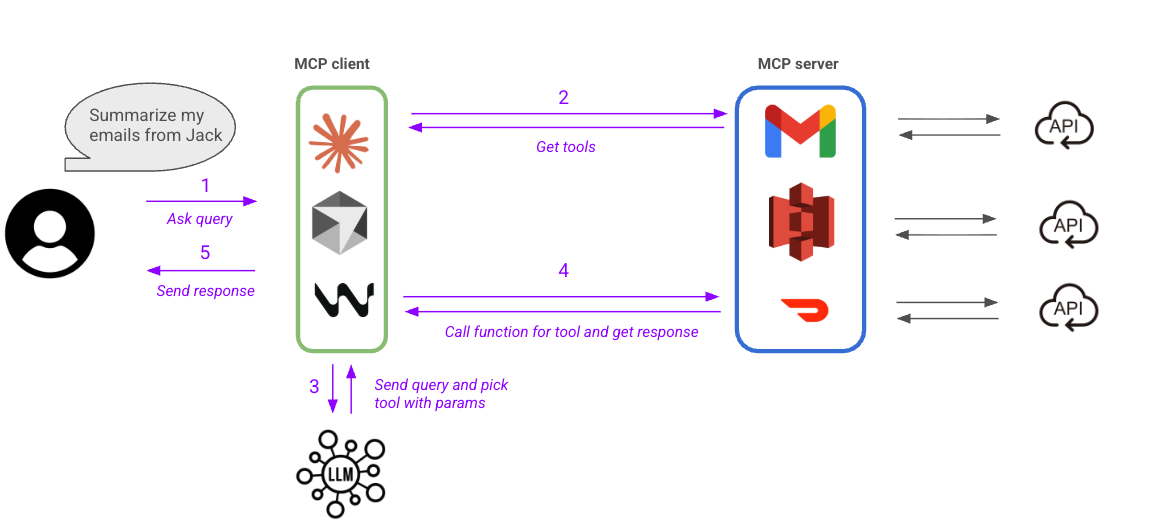
Why this matters: MCP extends Claude's capabilities to every API-accessible system in your organization. Combined with Skills, you can build complete workflows with both domain knowledge and real execution power.
Layer 4: Programming Interface — Agent SDK
When configuration-based extensions aren't enough for complex scenarios, the SDK gives you code-level control.
python
# main.py
from claude_sdk import ClaudeSDKClient

client = ClaudeSDKClient()

result = client.query(
    prompt="Review this code for security issues",
    tools=["Read", "Grep"],
    max_turns=10
)Capabilities:
- Full control over conversation flow, tool-call strategy, loop count, and context assembly
- Embed Claude as a component within your own system, not a standalone application
Best for: Custom agent systems, complex multi-stage pipelines, deep business system integration
How to Choose the Right Component
With four extension components, an integration layer, and an SDK, how do you decide what to use when? The quick heuristic:
| Need | Choose |
|---|---|
| Must execute identically every time | Commands (explicit) or Hooks (automatic) |
| Semantically intelligent activation | Skills |
| Isolated, expensive, or parallel work | SubAgents |
| Connect to external systems | MCP |
| Unattended CI/CD execution | Headless mode |
| Code-level orchestration | Agent SDK |
For a deep dive into how to think about combining these components — including composition principles, architectural patterns, governance design, and worked examples — see Systematic Thinking: Combining Skills, SubAgents, and More.
Key Takeaways
Claude Code is an AI Agent Framework, not a simple chat tool. It has a memory system, sub-agents, a skill system, hooks, an integration layer, and an SDK. Its real value lies in letting you build your own AI workflows and automation systems.
The four-layer architecture is modular and composable. Memory lays the foundation, the extension layer manages capabilities, the integration layer connects to the enterprise world, and the SDK provides code-level control. This layering enables incremental adoption — start simple, scale complexity as needed.
Engineering mindset + component composition = operator-level capability. You're not stacking configuration files — you're designing an AI-driven engineering system. Once you master this architecture and selection framework, you can restructure any AI coding tool into a controllable, agent-powered engineering platform.
Why This Architecture Transfers
Claude Code's four layers are not arbitrary — they map to universal requirements that every agent system must solve:
| Agent Need | Claude Code Layer | You'll Find This In... |
|---|---|---|
| Persistent context across sessions | Foundation (Memory) | Cursor's .cursorrules, Codex's project config, any agent with a config file |
| Extensible capabilities beyond base tools | Extension (Commands, Skills, SubAgents, Hooks) | VS Code extensions, Devin's tool integrations, any plugin system |
| Connection to external services | Integration (Headless, MCP) | API connectors, CI/CD hooks, any system that bridges AI to infrastructure |
| Programmatic control for custom workflows | Programming Interface (SDK) | OpenAI Agents SDK, LangChain, any agent framework with a code API |
Once you internalize these four layers in Claude Code, you'll recognize the same architecture — sometimes with different names, sometimes with different boundaries — in every agent system you encounter. The specific tool changes; the structural thinking transfers.
The rest of this chapter explores each layer in depth: Context Management deepens the Foundation layer, Sub-Agents and Agent Teams expand the Extension layer, Skills, Hooks, and Building Tools complete the capability picture, and Systematic Thinking ties everything together with composition principles for designing production-grade agent systems.