layout: post
title: Context Management
date: ‘2026-08-24 12:00:00’
permalink: /en/agentic-engineering/context-management/
categories:
- Agentic Engineering
tags: - context
- agents
site_locale: en
lang_switch: /agentic-engineering/context-management/
summary_en: >-
*Earlier in this chapter, How Coding Agents Work showed you the agent loop: read context → plan
→ act → observe → repeat. The quality of that loop depends almost entirely on the “read context” step. Get context
right, and agents produce remarkable work. Get it wrong, and no…
summary_zh: >-
*Earlier in this chapter, How Coding Agents Work showed you the agent loop: read context → plan
→ act → observe → repeat. The quality of that loop depends almost entirely on the “read context” step. Get context
right, and agents produce remarkable work. Get it wrong, and no…
topic_cluster: agentic-engineering
confidentiality_safe: true
series_id: agentic-engineering
content_id: context-management
series_mode: full
book_url: https://xinheliu.github.io/Coding-with-Agents/en/02-anatomy/context-management.html
canonical_url: https://xinheliu.github.io/Coding-with-Agents/en/02-anatomy/context-management.html
Context Management
Last updated: 2026-07-27
Earlier in this chapter, How Coding Agents Work showed you the agent loop: read context → plan → act → observe → repeat. The quality of that loop depends almost entirely on the “read context” step. Get context right, and agents produce remarkable work. Get it wrong, and no amount of prompting will save you.
Why Long Contexts Fail
Long context windows don’t automatically make agents smarter — if unmanaged, extra context becomes a liability instead of an asset.
- Large context windows (up to 1M tokens) make it tempting to “just stuff everything in.”
- In practice, agent performance often decreases as context grows, rather than improves.
- The real challenge is effective context management, not simply increasing window size.
Failure Modes:
1. Context Poisoning: Errors Become “Truth”
A hallucination or mistaken fact enters the context, gets repeated in summaries and plans, and the agent becomes stuck on impossible or irrelevant goals — unable to recover without intervention.
2. Context Distraction: Overfitting to History
As context grows, models begin to over-focus on past tokens at the expense of their pretrained knowledge. Gemini 2.5 starts repeating actions instead of innovating beyond ~100k tokens. Databricks found accuracy drops well before the max window, particularly with smaller models. Long context is most useful for summarization and retrieval — not for unbounded agentic reasoning.
3. Context Confusion: Overload from Too Many Tools / Irrelevant Info
Exposing all possible tools (MCP-style) can backfire. All models degrade with many tools in context and may even use tools when none is needed. Example: Llama 3.1 8B fails with 46 tools but succeeds with 19, even if both fit in context. If it’s in the prompt, the model must process it — noisy tool definitions and junk context actively reduce performance.
4. Context Clash: Contradictions Across Turns & Sources
Multi-turn “sharded” prompts perform much worse than a single, well-formed prompt (average performance drop ~39%; even o3 falls from 98.1% to 64.1%). Once a model “commits” to a wrong path, it tends to over-rely on past outputs and fails to self-correct. Agents are especially vulnerable as they aggregate multiple tools, documents, and submodels — each introducing potential conflicts.
Implications for Agent Design:
The most fragile setups are exactly those we care about: multi-step, multi-tool, multi-source agents working over long histories. Mitigations include dynamic or selective tool loading, “context quarantines” to isolate unreliable content, and more disciplined context curation instead of “dump everything in.”
The Research → Plan → Implement Workflow
If there’s one concept that separates effective AI-assisted development from frustrating prompt-mashing, it’s context engineering — the deliberate practice of structuring what the model sees to get better results.
Birgitta Böckeler at Thoughtworks defines it simply: curating what the model sees so that you get a better result. For coding agents, this encompasses everything from project-level configuration files (CLAUDE.md, .cursorrules) to the structure of individual prompts.
The emerging best practice follows three phases:
Research — Have the agent explore the codebase first. Understand the architecture, identify relevant files, and build a compact research document with file paths, function signatures, and system relationships.
Planning — Create a step-by-step implementation plan that the agent (and you) can review before any code is written. This is where you catch misunderstandings early.
Implementation — Execute the plan incrementally, compacting and updating context as tasks complete. Keep the context window lean — practitioners recommend staying under 40% utilization for best results.
flowchart LR
    Research[Research] --> Plan[Plan] --> Implement[Implement] --> Compact[Compact & Update] --> Research
This workflow is the context strategy in action — see How Coding Agents Work for the full agent loop behind it.
The key insight: the prompts, specs, and plans you write are the product. The code is just the output. As one practitioner put it, “CLAUDE.md > prompts > research > plans > implementation.” Focus your human effort on the highest-leverage part of the pipeline.
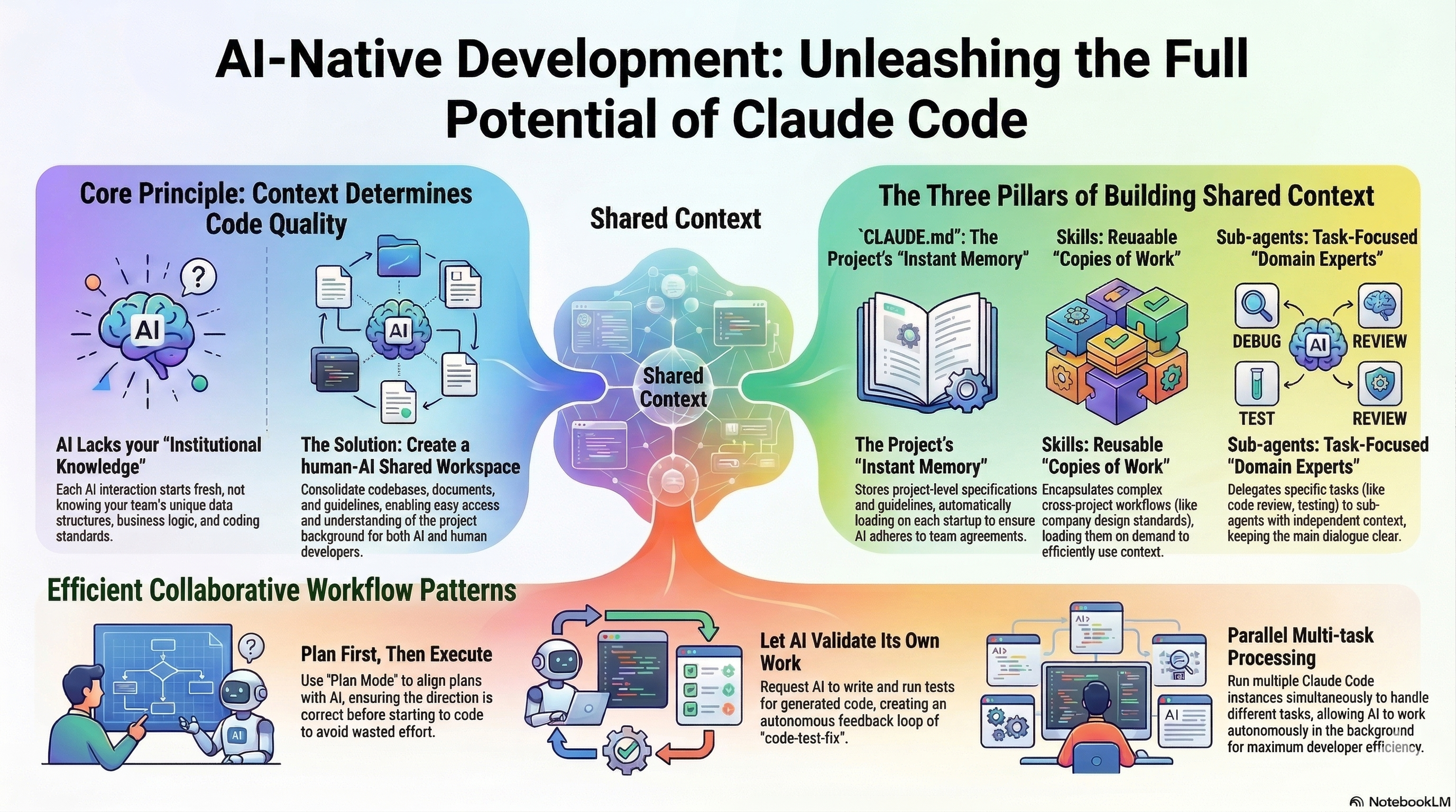
Context Management Principles
Good Context Leads to Good Code: How We Built an AI-Native Eng Culture
The central insight: high-quality software isn’t just about writing code — it’s about systematically building and sharing context between humans and AI agents throughout the development lifecycle. Without explicit, structured context, even powerful AI tools will make mistakes or produce low-quality output.
1. Treat the Repository as a Shared Context Workspace
Organize your code, docs, and agent guidance in a monorepo so both humans and AI have access to the same context. Natural language docs are first-class artifacts for AI to consume. Context artifacts include: high-level design docs (the “why” and “what”), implementation plans (the “how”), guides & tutorials for APIs/tools, and schema definitions and localized READMEs.
2. Build Context Hierarchically
A stepwise context construction process:
- Design – Human defines requirements and constraints
- Plan – The agent turns that into actionable tasks
- Implement – Agents generate most code; humans review
- Backstop – Tests and safeguards anchor context and prevent regressions
- Review – Human + agent validate work against context
- Update & Refine – Docs and context artifacts are updated for future work
3. Always Use Agents Within a Context-Heavy Process
Agents are used throughout — for commit messages, docs, planning, testing, and debugging — but never without context or supervision. Agents should augment human intent, not replace it. Context becomes the common language between human expertise and agent capability.
4. Use Tooling to Extend and Expose Context
Use MCP servers and command-line tooling so agents can access and update external sources of truth such as Notion / task trackers (e.g., Linear), database states and logs, and git history and PR metadata. This expands context beyond static docs into real-time system and project data.
5. Context Enables Ensembles of AI + Human Review
Rather than relying on one agent or one human reviewer, use multiple models (Claude, Gemini, o3, etc.) to cross-validate outputs. The shared context repository lets these models operate consistently and coherently.
Key Principles Summary:
| Do | Don’t |
|---|---|
| Store context explicitly in the repo (docs, plans, schemas) | Let agents operate with stale or incomplete context |
| Design context before implementation | Keep context only in your head |
| Update context with every change | Assume agents will infer unstated constraints |
| Use tooling to make external project information part of context | Trust agent output without review |